
What Is a Patch Panel?
Why Professional Networks Don’t Plug Ethernet Cables Directly into the Switch
If you’ve ever looked inside a professionally built network rack, you’ve probably noticed a row of neatly labeled network ports mounted above or below the network switch.
That’s called a patch panel.
At first glance, some people wonder:
“Why not just plug every Ethernet cable directly into the switch?”
It’s a fair question—and one we hear often.
The answer is simple: a patch panel protects your network, keeps it organized, and makes future maintenance dramatically easier.
In this guide, we’ll explain what a patch panel is, how it works, and why nearly every professional commercial network uses one.
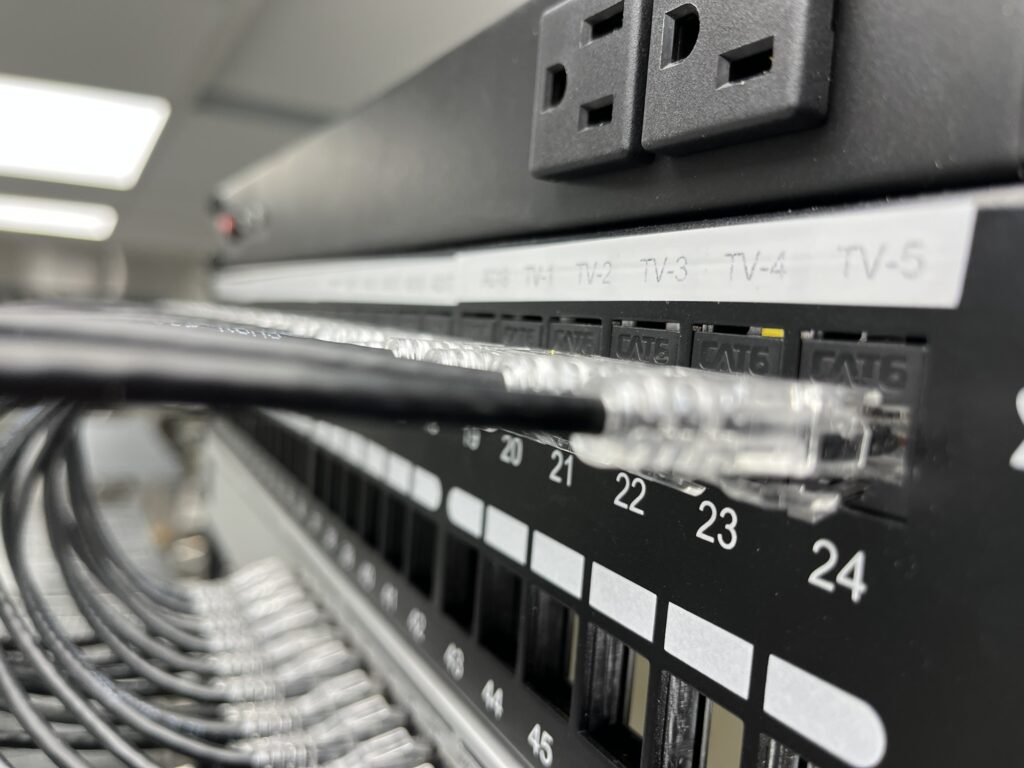
What Is a Patch Panel?
A patch panel is a passive networking device that serves as the permanent termination point for all of the Ethernet cables in a building.
Every cable that runs through the walls or ceiling terminates on the back of the patch panel.
Short, replaceable Ethernet patch cords are then used to connect the front of the patch panel to the network switch.
Think of the patch panel as the “interface” between the building’s permanent cabling and the active network equipment.
Why Not Plug the Cable Directly into the Switch?
Technically, you can.
Professionally, you usually shouldn’t.
Permanent network cable was never intended to be repeatedly plugged in and unplugged.
If you move equipment, replace a switch, or troubleshoot a network, constantly handling the permanent cable can eventually damage the connectors or even the cable itself.
A patch panel protects that investment.
Instead of disturbing the permanent cabling, you simply replace or move an inexpensive patch cord.
Think of It Like an Extension Cord
Imagine the electrical wiring inside your walls.
You wouldn’t want to unplug and reconnect that wiring every time you bought a new lamp.
Instead, you use an outlet.
The outlet stays in place, while the cord connected to your lamp can be plugged in, unplugged, or replaced whenever needed.
A patch panel works the same way.
The permanent cable stays protected, while the inexpensive patch cords handle everyday changes.
How Does a Patch Panel Work?
Here’s the basic path your network follows:
Computer
      │
Wall Jack
      │
Cat6 Cable Inside the Wall
      │
Patch Panel
      │
Short Patch Cord
      │
Network Switch
      │
Router / Firewall
      │
Internet
Every permanent cable has one job:
Connect a device location back to the patch panel.
From there, the patch panel connects to the switch using short patch cables.
This creates an organized, modular system that’s easy to maintain and expand.
What’s on the Back of a Patch Panel?
Most patch panels use 110-style punch-down terminals on the back.
Instead of crimping an RJ45 connector onto every cable, technicians use a punch-down tool to terminate each conductor according to the appropriate wiring standard (typically T568B in North America).
This creates a secure, long-lasting connection that is less susceptible to movement or strain.
What’s on the Front?
The front of a patch panel looks very similar to a row of Ethernet ports.
Each port is labeled to match a specific cable.
For example:
- Office 101
- Camera 12
- Conference Room A
- AP-03
- Printer 2
Those labels make troubleshooting much faster.
If Camera 12 goes offline, you know exactly which port to test.
Why Patch Panels Matter
Better Organization
Every cable has a clearly labeled home.
Technicians don’t have to guess where a cable goes.
Easier Troubleshooting
Need to test a cable?
Disconnect a single patch cord.
Need to move equipment?
Reconnect one short patch cord.
Everything stays neat and easy to follow.
Protects Permanent Cabling
The cable inside the walls is the expensive part.
Patch cords are inexpensive and easy to replace.
If a patch cord wears out, replace the cord—not the building wiring.
Cleaner Network Racks
Without patch panels, long Ethernet cables would hang directly into the switch.
Using short patch cords creates:
- Better airflow
- Easier cable tracing
- Cleaner appearance
- Faster maintenance
Easier Equipment Upgrades
Eventually, every network switch gets replaced.
With a patch panel:
- Disconnect the patch cords.
- Remove the old switch.
- Install the new switch.
- Reconnect the patch cords.
The permanent building wiring never moves.
Patch Panels and Structured Cabling
Patch panels are one of the core components of a structured cabling system.
A professional installation typically follows this order:
- Wall outlet
- Horizontal cable
- Patch panel
- Patch cord
- Network switch
This standardized approach is used in offices, hospitals, schools, warehouses, manufacturing facilities, retail stores, and data centers around the world.
Do Patch Panels Slow Down the Network?
No.
A properly installed patch panel has virtually no measurable effect on network performance.
As long as the patch panel and cable are rated for the same category (Cat5e, Cat6, Cat6A, etc.) and installed correctly, your network will perform as designed.
Common Types of Patch Panels
Cat5e Patch Panels
Designed for Cat5e networks.
Cat6 Patch Panels
The most common choice for modern commercial installations.
Cat6A Patch Panels
Built for higher-performance Cat6A systems and environments that require additional bandwidth.
Shielded Patch Panels
Used with shielded Ethernet cable in environments where electrical interference is a concern.
Fiber Patch Panels
Designed specifically for terminating and managing fiber optic cables using adapters such as LC, SC, or ST connectors.
Common Mistakes
One of the most common mistakes is skipping the patch panel to save a small amount of money.
While this may reduce upfront costs, it often leads to:
- Messier racks
- Harder troubleshooting
- More cable wear
- Difficult equipment upgrades
- Higher maintenance costs over time
Another common mistake is failing to label patch panel ports. An unlabeled patch panel can turn a simple service call into hours of cable tracing.
Pro Tip from Planet Low Voltage
Whenever we install a new network, we label both ends of every cable before termination.
That means the wall jack and the matching patch panel port always share the same unique identifier.
Years later, when a customer calls with a problem, we can often identify the correct cable in seconds instead of spending hours tracing wires through the building.
Good labeling is one of the simplest—and most valuable—investments you can make in a network.
Frequently Asked Questions
Do I need a patch panel at home?
Not always.
For a small home network with only a few connections, plugging cables directly into a switch may be perfectly acceptable.
However, larger homes with structured wiring panels can benefit from using a patch panel for organization and future flexibility.
Can I plug devices directly into a patch panel?
No.
A patch panel is a passive connection point. Devices connect to the network through the switch, not directly through the patch panel alone.
Can I replace a patch panel without replacing the cables?
Yes. In most cases, the existing cables can simply be re-terminated onto a new patch panel if needed.
Are keystone patch panels better?
Many installers prefer modular keystone patch panels because individual ports can be replaced or changed without replacing the entire panel, and they can accommodate different connector types in the same panel.
Planet Low Voltage Recommendation
For virtually every commercial network, we recommend installing a properly labeled patch panel.
The cost of adding a patch panel during installation is relatively small compared to the long-term benefits it provides in organization, maintenance, troubleshooting, and equipment upgrades.
Combined with quality structured cabling, managed switches, and proper documentation, a patch panel helps create a network that’s easier to service and built to last.
What’s Next?
Now that you understand where every cable terminates, the next step is learning how all of that equipment is organized inside a network rack.
In our next guide, we’ll explore How Network Racks Work, including proper rack layout, cable management, power distribution, and the best practices professional installers use to build clean, reliable installations.
Continue Learning
- What Is Low Voltage?
- What Is Structured Cabling?
- Cat5e vs. Cat6 vs. Cat6A
- What Is Power over Ethernet (PoE)?
- What Is a Network Switch?
- How Network Racks Work
- MDF vs. IDF
- Fiber Optic Cable Explained